
Engineering & CI media
Normalize demo clips attached to pull requests, shrink screen-capture artifacts, and publish uniform preview bitrates.
handbrake.cc
Развивается открыто, с честными примечаниями к релизам о границах возможностей и кодеках.

Кратко
HandBrake is a volunteer-led desktop utility that re-encodes or remuxes video you already own. Teams reach for it when they want MP4/MKV masters, hardware-friendly bitrates, and the same tuning knobs on every OS you support.
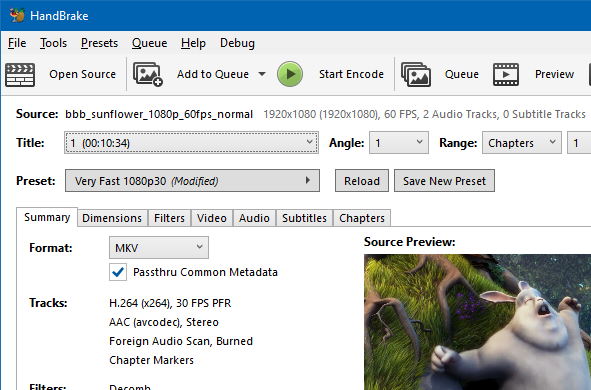
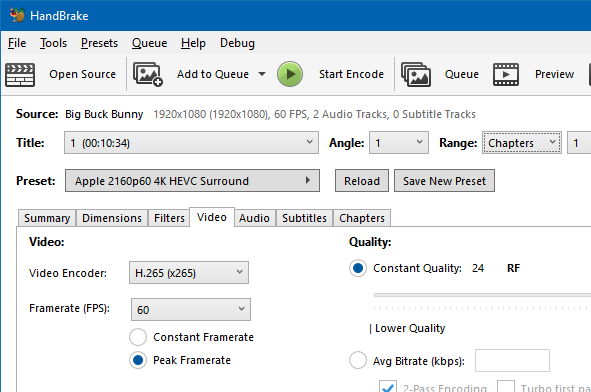
The interface balances quick-start profiles with granular tabs for video, audio, subtitles, and chapters. Queues keep long runs organized. It will not replace a timeline editor, and it will not strip DRM for you.
Основное
Begin with curated profiles, then drill into codec, filter, and audio settings when policies demand it.
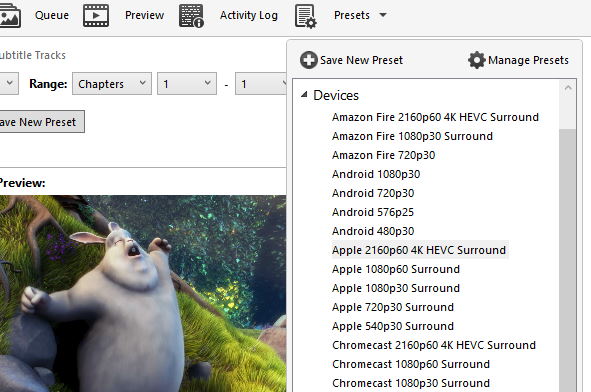
One-click targets for web and living-room devices, plus slots for your house standards.
Details
Trim letterboxing, fix interlaced footage, and denoise before bits are spent.
Details
Stack sources, pause/resume, and watch progress while CPUs churn overnight.
Details
Screens
Representative Windows UI captures. Select a thumbnail for a closer look.
Scenarios
Engineering demos, IT policy rollouts, and personal archives all benefit from repeatable encodes.
Normalize demo clips attached to pull requests, shrink screen-capture artifacts, and publish uniform preview bitrates.
Publish one internal playbook, cut down on rogue converters, and document a vetted path for training assets.
Shrink personal libraries, spin device-friendly copies, and retain subtitles/chapters when sources include them.
Compare
Plenty of tools touch video. This table sketches tradeoffs— not a buyer's guide endorsement.
| Evaluation angle | HandBrake | All-in-one converter apps | Non-linear editor exports |
|---|---|---|---|
| Core purpose | Dedicated transcode/compress with visible codec knobs | Wide format support, uneven expert depth | Storytelling first; export is one step in a timeline |
| Ramp-up | Gentle presets, deep tabs when required | Simpler UI, fewer engineering diagnostics | Steeper, because editing tools come along for the ride |
| Batch strength | Mature queue for repetitive encodes | Varies; automation hooks differ by vendor | Strong yet tied to edit complexity |
Plan lawful decryption upstream—HandBrake never removes DRM on its own.
Надёжность
Source drops are public, checksums are published, and mirrors should be verified. Train staff to spot repackaged installers and keep downloads on infrastructure you control.
handbrake.cc explains what HandBrake can do, where it stops, and how to install without surprises—read upstream release notes before fleet upgrades.
Voices
Paraphrased remarks from public download portals. Wording adjusted for clarity; views belong to original posters, not this site.
Community member
April 20, 2020
It is a good software for reducing file sizes, but I am disappointed that it is more NTSC than PAL format. I wanted to convert my file sizes to Fast 1080p25 and it only has Fast 1080p30. The next preset is Very Fast 576p25 which is not good enough for me since I am in a PAL region. I hope you will take this into consideration. Believe me, it is a good software.
Community member
September 19, 2019
It is so good and helps to reduce a bulky video so that storage and upload time are not big issues.
Community member
June 16, 2013
Worked flawlessly for me till recently. Updated to the latest version recently, but since then some DVD output files are broken up into a mosaic pattern with broken sound. Grateful for a fix!
Community member
January 28, 2013
HandBrake is a fantastic video converter of all time. HandBrake is a fantastic free tool MPEG converter for any kind of work, which is really fantastic. All my headaches have been resolved with HandBrake. Besides it is simple to use, a fast converter, free, and with preset options. From now on I must not worry about video conversion. Thanks to the developer and the beauty of a trusted mirror.
Community member
July 19, 2012
HandBrake has performed flawlessly for me and it is free. It is better if you know a bit about what you are doing first, but with a bit of research and a bit of trial and error, I have been getting great HD rips from Blu-ray. It does not remove copy protection, however, so you will have to use another tool to do that. Pros: great quality output, every setting I could want. Cons: can be a bit overwhelming if you are not experienced at ripping.
FAQ
Short summaries live here; the FAQ page carries legal, security, and workflow detail.
Heuristics sometimes flag open-source packers. Stick to signed mirrors, compare hashes, and route installs through your allow-list process.
No—supply already-decrypted or unprotected media before encoding.
Frame rates, aspect ratios, filters, and rate control all matter. Presets help, yet knowing your source removes guesswork.
Pull the current build for your OS, verify checksums, and share the walkthroughs internally.
